Blaze Checkout
Reduced payment support tickets by ~27.41% during peak UPI traffic by designing a time-aware payment confirmation flow.
Company
Bureau ID
Timeline
2 weeks
Role
Sole Product Designer
Team
1 Product Manager 2 Engineers (FE+BE)
At a glance
Problem
Peak UPI traffic left ~3–5% of users frozen on a payment processing screen. Lacking immediate system feedback, first-time buyers panicked, fearing they had been scammed.
Solution
A time-aware confirmation flow using an evolving shopkeeper character. The interface dynamically mirrors and manages user anxiety instead of showing a static loader.
Outcome
During the Republic Day sale, across 12 brands that shared categorised support data.
~27%
Payment related support tickets
Zero
"Payment stuck" support tickets
Context
Blaze Checkout was a checkout layer used by D2C brands on their Shopify and WooCommerce stores.

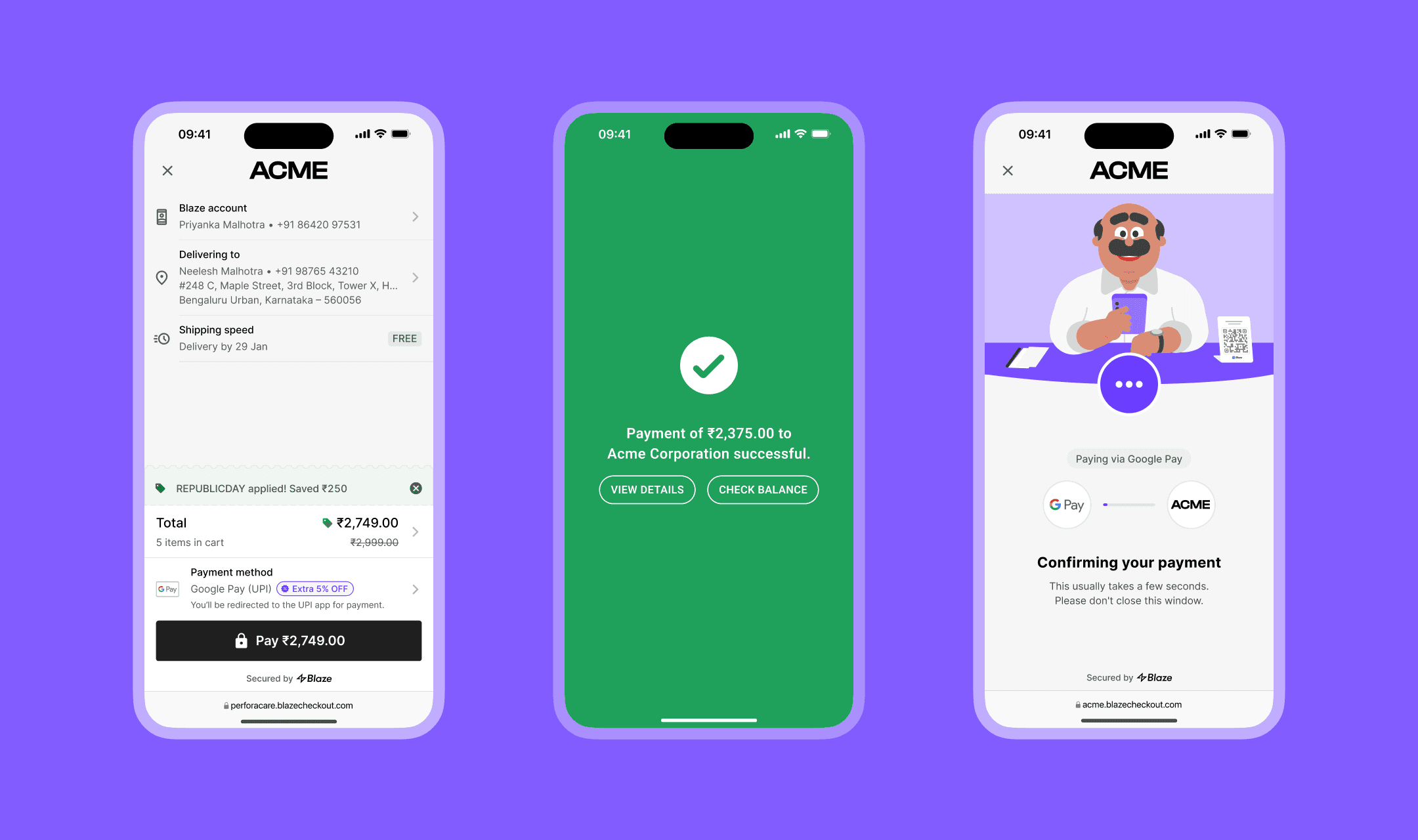
Some of the merchant checkouts powered by Blaze.
Most shoppers using Blaze had never bought from those brands before. The brand was unfamiliar. The checkout was unfamiliar. The only familiar part was the UPI app.
Scale at the time
23
D2C merchants on Shopify & WooCommerce
~97%
First-time buyers on unfamiliar D2C brands
Trust had to be earned in seconds, and could be lost in one.
How Blaze fits in
When a user tapped Pay on Blaze Checkout, we redirected them to their UPI app, to complete the transaction. After the user completed payment in their UPI app, Blaze waited for a webhook callback from the payment gateway to confirm the transaction.
Usually, the webhook callback arrived quickly. But during peak traffic, it sometimes lagged by a few minutes.

User leaves Blaze for the UPI app and returns for confirmation.
The problem
In early January, we onboarded 12 new merchants, growing from 11 to 23. At that scale, a hidden issue surfaced across multiple brands.
"UPI app says paid. Checkout says processing."
Two screens, two different stories.
The funnel data looked healthy. Payments were completing. But merchant support queues told a different story.
Users were not complaining because payment failed. They were complaining because the two systems showed different truths.
What we saw
3–5%
Payments delayed during peak hours
2.1x
Merchant base growth in 30 days
~42%
Support tickets traced to payment confusion
What was actually broken
The payment succeeded in the user’s UPI app. Blaze just did not know yet.
During Republic Day traffic, users would complete payment, see “Payment Successful” in their UPI app, and return to Blaze. But Blaze was still waiting for the gateway callback.
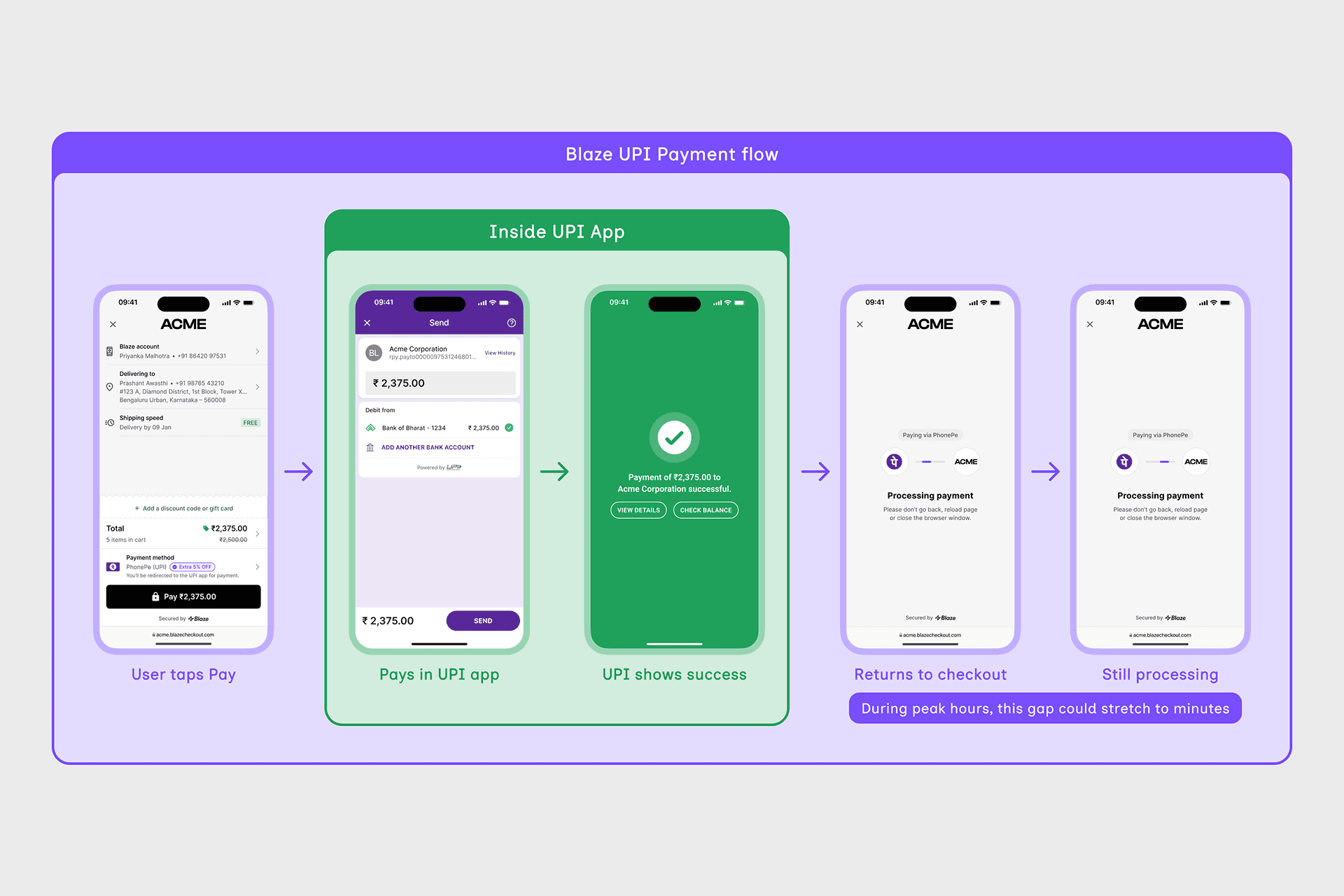
For a first-time buyer on an unfamiliar brand, this was not a technical delay. It looked like money had left their account and the checkout had frozen.
"Did I just get scammed?"
Callback logs confirmed the pattern: a small number of delayed confirmations were driving a disproportionate share of payment-related support tickets.
The webhooks were infrastructure I could not speed up. But I could design for the wait.
What I ruled out
The obvious fixes failed for the same reason: they relied on changes too subtle to register in a moment of panic.
Exploration 1
Text-only states
Three states. Three copy variations. Same visual hierarchy. To a panicking user who was not reading carefully, all three screens looked almost identical.
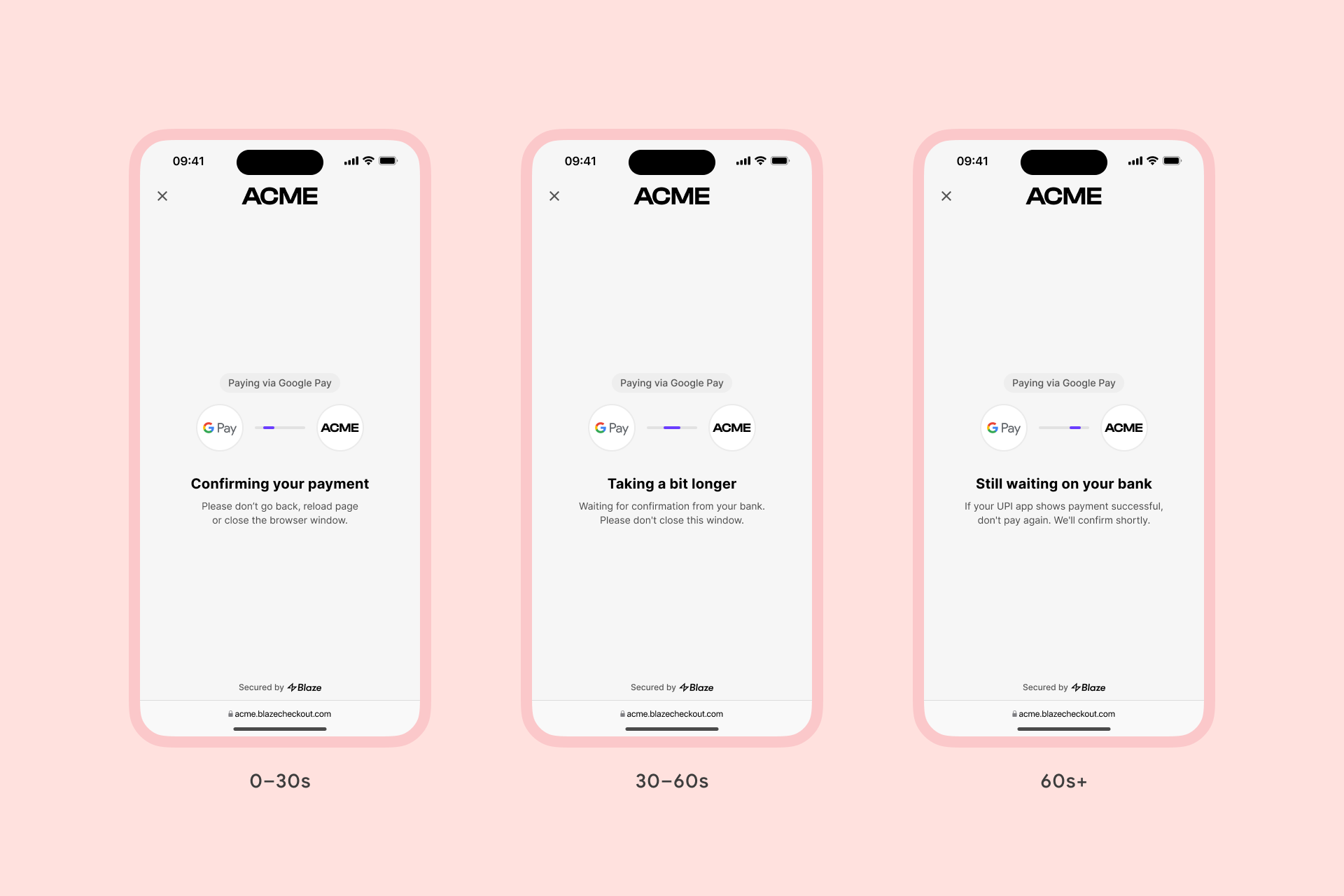
At a glance, nothing changed.
Exploration 2
Spot illustrations
Adding small illustrations helped, but not enough. The icons were too subtle, and the overall screen still felt like a static processing state.
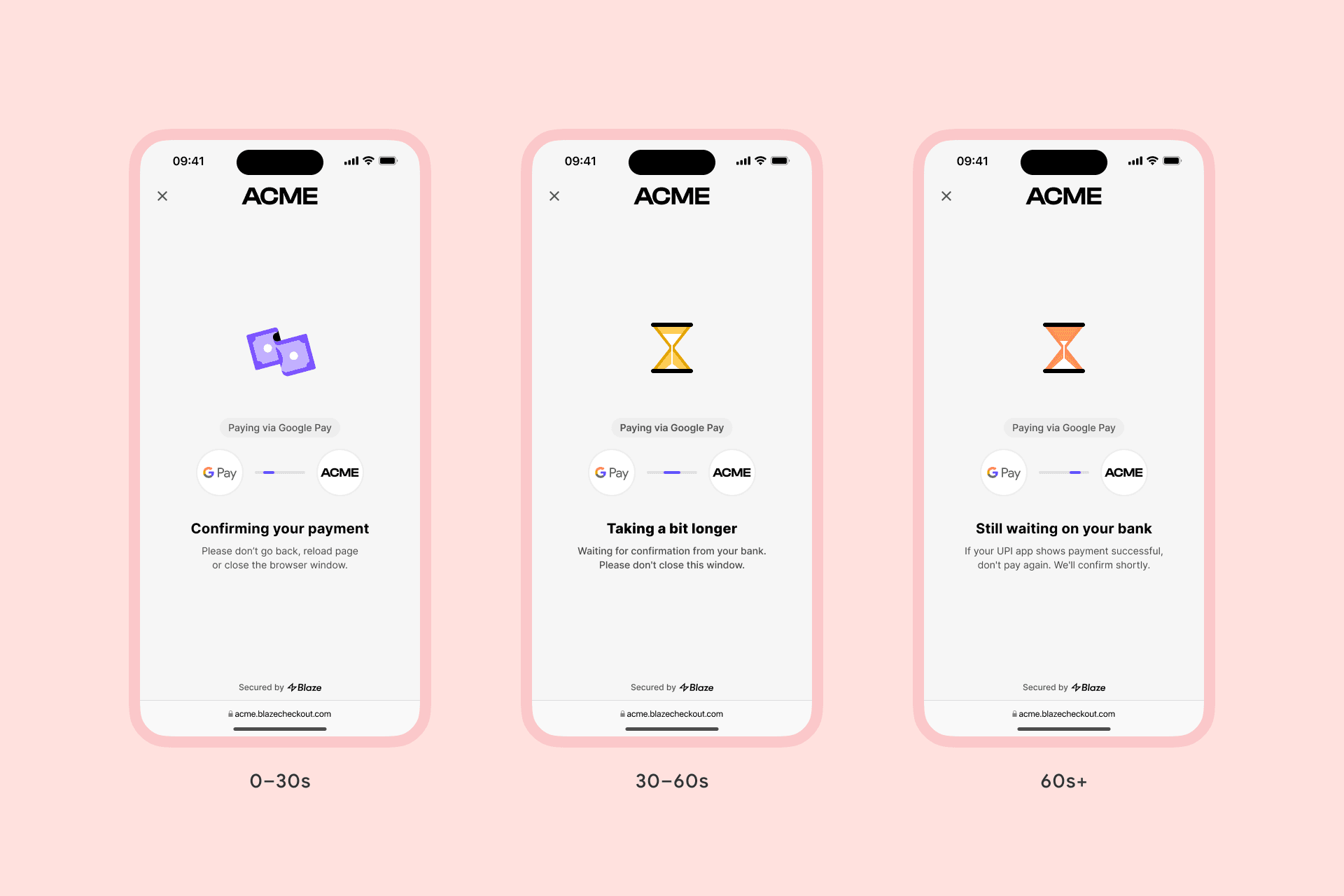
Better than text, still easy to miss.
Decision
The wait state needed a visual change users could simply understand before reading. So I looked at how this moment already works offline.
How Indian shopkeepers wait
In India, UPI QR payments are everywhere: kirana stores, chai stalls, auto rickshaws. When you pay and the money leaves your account but has not reached the shopkeeper yet, both of you do the same thing. You both stare at your phones.
That was the interaction missing from digital checkout. Not a fix for the delay. An acknowledgement of it.
Design principles
Acknowledge, don't mask
When the system is uncertain, the interface should not pretend everything is fine.
Mirror, don't reassure
In this context, shared concern felt more honest than generic reassurance.
Escalate, then hold
Concern should increase with wait time, but stop before it becomes panic.
Thank, don't notify
Success should feel like a human gesture, not just a status update.
The solution:
Designing for uncertainty
The interface needed to treat waiting as a state, not a gap between two states.
So I designed a time-aware confirmation flow where the shopkeeper checked the payment with the user.
0-30s
😀
Confident
Confirming payment.
30-60s
😥
Concerned
Still checking.
60s+
😳
Worried
(but never panicked)
Taking longer than usual.
Implementation note:
The interface responded to elapsed time and immediately resolved whenever payment confirmation arrived.
The pushback
The PM raised a fair concern.
"Won't showing concern make users more anxious?"
The risk was real. Mirror panic, and you amplify it. So I designed an anxiety ceiling: concerned, but never alarmed. The goal wasn't to dramatise failure. It was to make the system feel aware.
The static argument had not moved him. Walking him through the prototype did. Once the expression was dialled down to concerned, not panicked, and the timing logic was visible, we shipped.
What shipped
The shipped flow tied the shopkeeper's expression to elapsed time. The longer the wait, the more visibly he checked alongside the user.
The shopkeeper mirrors user anxiety as the wait increases.
And when the payment finally confirmed, the shopkeeper smiled.
Payment confirmed. The shopkeeper smiles.
A gesture of thanks, borrowed from the kirana store moment.
"Thank you, come again."
Users did not just see a success message. They got acknowledgement.
Before & after
Before
The system looked frozen.
A static processing screen kept spinning while the user waited for payment confirmation.
After
The system looked aware.
The payment confirmation screen responded to elapsed time while the user waited.
Same wait. Different feeling.
Result
The fix shipped on January 25th, during Republic Day sale traffic. Discovery, design, and implementation happened in a single sprint.
Impact measured
~27.41%
Fewer payment support tickets
Zero
"Payment stuck" support tickets
A note on the data:
This compares the week before launch to the week after, both during peak sale traffic.
12 of 23 merchants tracked tickets by category and agreed to share the data; the other 11 didn't categorise or didn't share.
What I'd do differently
Two weeks, mid-sale. Some checks had to wait for the next iteration.
Talk to users directly
The shopkeeper concept was informed by personal observation, not by direct research.
Test illustration vs copy
An A/B test would have isolated the impact of the character itself.
The takeaway
The slow path, the 3–5% of users on the wrong side of an infrastructure delay, is where trust gets built or broken. When systems cannot promise certainty, interfaces can still offer acknowledgement.
Waiting isn't binary. Interfaces shouldn't be either.